Showing posts with label windows. Show all posts

Aug 15, 2013

Did you know? Windows 7 Cool feature

Warning: I've started to write this post a long time ago (whence references to Windows 7 as the new kid on the block) but I refrained to posting it since I could not verify the behavior; now I decided to give it another try.... :).


A common complain on Windows platform is that whenever you try to use a file already being used by another process there is no easy way to find out which process is using that file. The canonical sample is trying to delete a file using Windows Explorer:

It happens that Windows Vista introduced a new COM interface named IFileIsInUse that could be used to allow other processes to figure out which process have the file open. Unfortunately, AFAIK (and based on the MSDN documentation), applications must be aware of this interface and actively do something with it if they want to play nicely with other applications, including the OS. 

This morning I was reading some blog posts and someone suggested that Windows 7 had finally fixed this misbehavior (bug?). Cool! Now I could not resist playing a little bit with it.
My first try was to run a C# application that just kept a file open until some key is pressed and try to delete the file; Wow! it worked perfectly! 
But now I was left wondering whenever this could have something to do with CLR 4.0 changes (since I was compiling with VS 2010). You know, maybe the FCL team decided to do the IFileIsInUse interface dance internally (when you open a FileStream for instance).


In order to solve this doubt I took 2 actions:
  1. Targeting CLR 2.0 (by changing VS configuration for the project)
  2. Write a native C++ application to do the same thing as the C# one (the code bellow).
  3. Compile the same native program (2) with VS 2010 on Windows XP box (which has no support for IFileIsInUse at all)
  4. Compile the same native program (2) with VS 2010 on Windows Vista box (which does has support for IFileIsInUse)
#include "stdio.h"

int main(int argc, char* argv[])
{
 const char *fileName = "Test.txt";
 FILE* p = fopen(fileName, "w+");
 if (p == NULL)
 {
  printf("Unable to create file...");
  return -1;
 }

 printf("[%s] Press any key to close the file ", fileName);

 getchar();

 fclose(p);

 return 0;
}
and in the first two cases (i and ii) the result was the same: Windows Explorer was able to detect which application had the file open (with no extra effort from my side :)! Really nice! (Ok, I agree, Windows should have been doing this for ages, but better late than never, don't you agree ? :)


By the other hand, in the last 2 cases (iii and iv) explorer failed to detect the application that had the file open (with exclusive rights).

To me looked like on Windows 7 (and 8 also BTW) Windows Explorer is falling back to NtQuerySystemInformation if it cannot find an IFileIsInUse entry in ROT. So I wrote a simple app (DumpROT.cpp) that searched the ROT for IFileIsInUse implementations and as I suspected when I run the app that keeps the "Test.txt" file open, RotDump fails to find any IFileIsInUse in ROT (it looks like even Libreoffice fails to register opened files in the ROT). Some other programs I've tested (including Visual Studio 2012) didn't registered open files either (see the output bellow):
The -verbose command line option instructs DumpROT to show all entries in the ROT irrespective to what these entries references.

As a last test I decided to run MS sample for this interface and voilá it does register an IFileIsInUse reference in the ROT for the chosen file!

This output was obtained by running DumpROT with the same set of opened files from the previous one (since I omitted the -verbose option the tool gave no feedback). Then I run it again, but this time with -verbose option; you can see in the output that no reference to IFileIsInUse was found in ROT.  Next step was to run FileIsInUseSample (the MSDN sample with some changes to accept a file path through the command line) and executed DumpROT again; this time you can see that DumpROT found an entry to "output.txt"  (the file passed to the sample app) in the ROT.

Unfortunately I don't have MS Office installed here to check whenever it takes advantage of this feature or not.

Happy coding!

Adriano

Aug 2, 2013

Getting Windows 8 on a Macbook Pro

I am typing this post on a new, shine Mac Book Pro with a retina display, a big SSD and lots of memory ;)

But instead of using Mac OS I decided to go through the bootcamp route and install Windows 8 (sorry, I cant't code in C# without Resharper anymore :)

Well, since this solution is an official solution (from Apple) I expected everything to go really smoothly and without any major issues (other than the Windows 8 ones... :). This was my first disappointment with Apple; first I tried 3 different flash disks (pendrive) but bootcamp just hangs without any information why (no one can blame Windows for this ;). Some times it just said "an error occurred while copying windows files to the flash disk" (or something like that). 

I even tried 2 different external hard drives with the same outcome. In the end I decide to do it the way the "pros" does, i.e, I manually created a bootable flash drive using a Windows 8 x64 image, used bootcamp to install it (but not to install the drivers) and as soon as Windows booted after the installation finished I downloaded and installed the bootcamp drivers manually.

Finally I had an working machine (hey, it is really fast) (moving from an old Q9400  to a new I7 machine makes a huge difference) and was happy... until trying to close the notebook lid (expecting to put Windows to a good sleep) and noticing it just turned the computer off. 

While googling trying to understand what went wrong I realized this is a relatively common issue with this setup (at least lots of people was asking similar questions in various online forums); the problem is that it looks like some device driver don't support sleeping. You can confirm this by running the following command in the command line:

powercfg -a

In my case I just got this:

The following sleep states are available on this system:
    Hibernate
    Fast Startup

The following sleep states are not available on this system:
    Standby (S1)
The system firmware does not support this standby state.

    Standby (S2)
The system firmware does not support this standby state.

    Standby (S3)
The system firmware does not support this standby state.

    Standby (Connected)
The system firmware does not support this standby state.

    Hybrid Sleep
Standby (S3) is not available.

Notice the line saying the system do not support S3 sleep state; this is exactly the state the machine should enter when its lid is closed.. 

Later I found this joy in a FAQ on Apple site:


23. My Macintosh running Windows 7 or 8 does not sleep when a Thunderbolt device is plugged in.  Is this normal?
Yes. Sleep is disabled in Windows 7 or 8 while a Thunderbolt device is plugged in.
Well done! Anyway, it looks like I do have an workaround; do not use thunderbolt devices. I'll try.

What do you think?

Aug 15, 2012

Windows 8 / Visual Studio 2012

Hi

Getting back to the subject I am more comfortable with, MS just released Windows 8 / VS 2012 (for MSDN and Technet subscribers). Off course I am downloading both right now but this is the first time, since Windows 95 launch, that I am not going to install the new MS OS as soon as it gets released. 


To be honest I am not even considering installing it (on my main dev machine) in the next 6 ~ 12 months! Contrast that to what I've been doing in the past 
(I've used Vista / Windows 7 RC!) and you can see how "excited" I am about it (maybe I install it on a virtual machine so I can experiment with it). Anyway, sooner or later I'll end up formatting my dev machine and the question is: am I going to give Windows 8 a try? Or shall I take a more drastic approach and install Ubuntu? This bring me to the second MS release.. VS 2012.

One of the main reasons I'm procrastinating migrating to a Linux OS is that I really enjoy developing using .Net (yeah, I do know Mono; the problem is: the bulk of .Net development is still concentrated on MS platform. Also, 
IMHO, *nix lacks a good .Net IDE).

Of course my friends (at least the ones in the software development field) knows that that is not completely  true: I also enjoy MS technology in general (COM+ pops up as one example).


What do you think? Should I dive into Windows 8?


BTW: Visual Studio download finished! This one for sure I'll get installed in the next few days ;)

Happy codding!

Jul 7, 2012

Did you know (Part II) File / Registry virtualization on Windows 7 / Vista

Hi

In this post I discussed some issues I faced regarding software running on Vista 64 bits. Well it ended up that all my troubles was happening because my program (64 bits) was launching IE 64 bits (instead of the 32 bits) and I had not installed Silverlight plugin on it! Solution: just switch my program to 32 bits and it worked as expected!

In this post I want to discuss some pitfalls when running software on x64 bit versions of Windows (most of the discussion applies equally well to Vista x64 ,Windows 7 x64 and probably to newer versions also - haven't tried it with Windows  8 but I bet that the behavior is the same).


Keep in mind that when talking about the reasons that lead Microsoft to add a specific feature I am just speculating, so take every word with a grain of salt :)


On previous Windows versions, to many (almost every single?) developer used to login as
admistrator into their workstations1 so there were way to many applications that relied on being able to change system resources (such as to create files/fonders under "Program Files"), after all they always succeed doing that since developers had the rights to do so (remember, administrator...).

At Vista launch time MS had a tough issue to deal with: how raise the bar for system security / stability without breaking such ("legacy") applications?


AFAIK a compromise was settled so Windows development team decided that for
some 32 bit applications such requests would not fail, but instead, Windows would lie to the calling process and would just create the file somewhere else (the same principle apply to registry access): this feature is known as file virtualization (the rules that governs whether file/registry will be enabled or not for a specific process can be found here)

Note that this feature is meant to allow
legacy applications2 to run on the new platform (at that time, Windows Vista) so Microsoft plans to remove it (as soon as your application gets compiled as 64 bits, virtualization will be disabled anyway).

If you are running the 64 bits version of Windows 7 (or Vista for that matter) y
ou can try it right now by downloading the test application source3 and running it with something like:

FileSystemVirtualizationTest.exe -e %windir%\test.txt "adriano's test"
For now, just run it with the arguments shown above and take a closer look in the produced output:

Virtualization ENABLED.

Virtualization is ON

14 bytes writen to C:\Windows\test.txt
It seams that the application succeed in creating a file under %windir% (which it should obviously not be allowed to) but how can we confirm that? Easy, just run the application again now providing only the file name (the application will try to read the file and dump its contents):
FileSystemVirtualizationTest.exe %windir%\test.txt

Virtualization is ON

adriano's test
and there it is! But wait! Let's open Windows Explorer and try to locate the file. Hey! I can't find the file anymore! Windows search can't find it either:

But the application does succeeded opening the file! how can that be? Launch Windows Explorer again on %windir% folder but this time paying attention to the little button: "Compatibility Files":

Ok, now that you noticed this button, press it and Windows Explorer will open a folder that looks like the one bellow:


Wow! Windows just created the file under %localappdata%\VirtualStore\Windows folder (which is a per user folder). 

This way Windows let applications believe they had successfully updated files / folders / registry keys when actually they didn't (preventing possible global system corruption). Clearly avoiding system corruption is a fair reason to support this functionality, but now, developers (and IT admins) must pay attention to scenarios with mixed 32 / 64 bits applications interacting in such ways that they need to observe changes from each other (since the first ones may be writing to the virtual store and the last ones will not see the virtual store).

Last, but not least :), make sure your application do not depend on registry/file virtualization; these mechanisms were introduced sonly to raise the likelihood of legacy applications to run without problems on Windows versions with stricter security settings (Vista, 7, etc). So if you have an application that does writes to protected file system areas, please do your users a favor: update it to write to a more appropriated location (%appdata%, %localappdata%, etc).

Bellow you can find some links if you want to read more about file system virtualization:


Have fun!

Adriano


[1] I am guiltily of doing the same thing :(
[2] Basically all applications developed for previous Windows OSs are handled as legacy by Vista
[3] In the first drafts of this post I used Notepad++ to write to %windir% but it looks like they added a manifest in the latest versions so it will not work for our demonstration purposes. Even in my sample application I was required to remove the manifest explicitly (VS 10 included one that disabled virtualization)

Mar 10, 2009

Automating Skype through COM

Wow.. finally a technical post again :)

Those of you who knows me knows that I am a firm believer of component technologies.

Personally I really appreciate Microsoft's COM technology; ok, it does has it drawbacks (as everything in life) but when used correctly it proved to be a very powerful way to support software automation and extensibility. Let me briefly explain what those funny words means for those who don't know yet.

Basically, software automation is the process of a software controlling another one. For instance, if you have Microsoft Office installed it's possible to write a program (even a JavaScript script) that creates a Word Document through automation, i.e, your program may "control" word (and Excel, Power Point, etc). This kind of flexibility can be very helpful in some scenarios.

By extensibility I mean ways of extending a given application. A good example is Windows Explorer; it's possible to add new items to a context menu (in the same way 7-Zip and many other applications do) simply by implementing an specific COM interface (and registering your component of course).

These are just 2 examples of what's possible; of course other softwares also support some level of automation (for instance Adobe Acrobat).

In this post I just want to talk (again, briefly) about Skype and how it's possible to extend it through COM (Skype also supports automation through Java, XXX, etc).

First let me just explain that the possibilities are infinite; what you may want to do with automation is not my business :); all I can say is that if you think a little bit you'll be able to find some nice use for skype automation.

For instance (as I said in my last posts) I use Skype heavily on my work to communicate with other team's members. At least once per week we do a Skype meeting in order to decide what we're going to do in that week; to manage these tasks we have a "queue" of tasks in our Jira installation.

One annoyance during this meeting is that once someone decide he wants to take a specific task the process involves at least 2 steps: to announce in the chat meeting and going to the browser to update Jira.

Since it's possible to automate Skype I wrote (to be more precise I am debugging it right now) a "plug-in" that simply keeps listening all chat messages and react accordingly for specific patterns; for instance if I want to take a task (let's say TSK-1) I may just type:

$jira assign TSK-1 myself

This way I announce to the team and update Jira at once :) (I don't need to go to the browser anymore)

The plugin is "smart" enough (through configuration) to figure out who I am ("myself") and to go to Jira (through a WebService) and update the specific issue (task).

And this is only a basic example about what can be done (the sky is the limit :).

For more information about Skype automation visit
https://developer.skype.com/.

If you want to take a look into this plugin, just grab the code at: git@github.com:adrianoc/binboo.git or browse the code online at https://github.com/adrianoc/binboo (just keep in mind that there're lots of assumptions/dependencies to our Jira installation but I guess one can learn a lot about how to integrate to either Jira or Skype). 


See you.

Adriano

Jan 21, 2009

WIX Tips

Hi.

Since I have been playing a lot with MSI installers latelly and I'd like to share two tips with those authoring Windows Installers with WIX:
  • You can get a lot of information by running your installation package through msiexec:

    msiexec /i CustomAction.msi /lvx log.txt

    The command above just runs CustomAction.msi logging everything including the kitchen sink :)

  • You can use 7Zip to open msi files (and ofcourse, extract content from it)
Happing programming ;)

Adriano 

Jan 7, 2009

First impressions of Windows 7

Hi,

As a computer addicted I decided to download Windows 7 Beta 1 (32 bits) and give it a try (if you are interested, just search for "Windows 7 Beta1" in your favorite search engine and I am sure you'll find your way :)

In this post I want to present my first impressions about it. Please, note that I am not an expert in this subject and also that this is just my opinion based on my perception without any pretension regarding "data" accuracy.


I need to admit that I am impressed about it. My first impression is that it is way faster than Vista when running on the same machine; at least it is pretty responsive. Bellow you can find a list of items that caught  my attention and won my respect (at least for now):


  • Fast Installation: ~ 20 min for a full install.

  • Few prompts during installation.

  • No problems with device drivers at all (Video, audio, keyboard, etc)
    • Some devices already have preliminary versions for Windows 7
      I guess that this is more a result of not introducing deeper changes to the driver model (Vista introduced really deep changes there).

  • There are some compatible antivirus already.

  • Looks really fast on a relatively old hardware

  • I really liked the UI changes (even being minor changes).
     
  • Just a few UAC prompts
    • Using it for some time I have seem UAC prompts only for software installation.

  • IE 8 is not as fast as I'd like it to be. (But I've already installed firefox)
 Bellow you can see a screen shot.


Well, that's it for now.


Adriano

Nov 5, 2008

Are you a C# developer?

If so, you should go and grab a copy (for free) of CodeRush Xpress for Visual Studio!

(I already own a copy of another addin, but I'll give it a try anyway :)

Adriano 

Nov 2, 2008

PDC 2008 Videos - For free!! :)

Hi.


Are you a Windows developer? Or simple a Windows enthusiast? So you probably is aware of Microsoft PDC 2008. 

I'd love attend it but I couldn't  :(

At least we can grab (all?) Microsoft PDC 2008 Videos.

Have fun!

Adriano

Oct 5, 2008

Back to Vista x64

Hi,

Some time ago (sometime around 10/2006) I installed Windows Vista (a release candidate at that time) on my home machine in order to "try" it (to be sincere I've installed various Vista beta/release candidates).

Performance was not impressive but since I'm a software developer (and I didn't used the machine to work anyway) I decided that it worths to be able to experiment with new API / functionality so I kept it.

Some time after that it was released so I got a copy and installed in the same machine.

On 10/2007 I joined db4o and started to work from my home which means that my machine now plays an important role in my development productivity and I decided that I'd rather go with Windows XP (x86 or 32 bits) again (due to the performance impacts I got with Vista x64).

Well, one year passed and I got a new machine (a pretty fast one, lets say) and so I decided to give Vista x64 a try again.

In the first days I do got some BSODs (which made me feel frustrated) but after spending some time searching I found some suggestions regarding memory configurations; after applying such changes (I just set the times after memory manufacturer specifications and increased memory voltage by 0,1 volts) it became stable (no BSOD since them). 


I can say that I'm satisfied up to now; no hardware or software conflicts, performance is pretty good (much faster than my previous machine running Windows XP - I know, XP would run even faster on this machine).

See you.


Adriano

Aug 11, 2008

Extracting files from a MSI file.

Today I was looking for a way to extract files from a msi installation package when I found a blog just explaining how to do it:

msiexec /a filepath to MSI file /qb TARGETDIR=filepath to target folder
Despite the original blog title it does work with XP :) Adriano

Jul 23, 2008

My mind is about to blow

Hi. That computer technology evolves day by day and the amount of information in this area is gigantic many of you already know (so do I), but today I was talking to a friend of mine and I realized how many books I want to ready (only in the subject Windows + .Net). If you are curious you can see the list here but most of them were not published yet (and here you can find a list of some books I've already read / I'm reading). What do you think about them? Is there any other book related to .Net / Windows development you consider a must? PS: Feel free to give some of them as a gift when they get published :) Adriano

May 14, 2008

Type safe / refactor friendly configuration for Db4o - Part II

In my last post I proposed to derive field names from a property accessor in order to gain type safety and compiler support when configuring some aspects of D4bo.

So, given the following class:

public class Test
{
   private int _age;
   public int Age
   {
      get { return _age; }
      set { _age = value; }
   }
}
we could use the following code:
IConfiguration cfg = Db4oFactory.NewConfiguration();
cfg.ObjectField((Test t) => t.Age).Indexed = true;
instead of:
IConfiguration cfg = Db4oFactory.NewConfiguration();
cfg.ObjectClass(typeof(Test)).ObjectField("_age").Indexed = true;
to configure a field to be indexed. The first step to use this syntax is to be able to figure out the property being accessed. To demonstrate how this can be done let's write a simple function that takes advantage of C# Expression Trees:
public string GetPropertyName<T,R>(
               Expression<Func<T,R> exp)
{
  // Get the property name here.
}

public static void Main()
{
   string s = GetPropertyName((Test t) => t.Age);
}
When compiling the above code, the C# compiler will create an expression tree representing our lambda expression ( (Test t) => t.Age) and pass it along to GetPropertyName() function.

Inside this function we can just use the Body property (which in this case represents t.Age part of our lambda expression) and cast it to MemberExpression. Now all we have to do is to consult MemberExpression.Meber.Name property:

public string GetPropertyName<T,R>(
               Expression<Func<T,R> exp)
{
    MemberExpression me = fieldExp.Body as
                             MemberExpression;
    if (me == null) return "na";

    MemberInfo m = me.Member;
    return m.DeclaringType.FullName + "." + m.Name;
}

At this point we are able to figure out the name of the property being accessed! If you take a deeper look into me.Member we will see that it is a PropertyInfo instance where you can get a lot more information about the property.

In the next post I'll dig a little bit deeper and investigate how we can select a field based on the property being accessed ;)

Thoughts?

Adriano

Apr 24, 2008

Redirecting standard error output in cmd.exe

Hi. Suppose you have the following C++ program (in a Windows box):
#include "stdafx.h"
#include "string.h"


void write(char *str, FILE *target)
{
fwrite(str, strlen(str), 1, target);
}

void _tmain(int argc, _TCHAR* argv[])
{
write("Test:stderr\r\n", stderr);
write("Test:stdout\r\n", stdout);
}
and you want to redirect its output to a file. We could try something like in Windows console:
test.exe > myfile.txt

Unfortunately the naive approach don't work because there are data being outputted to stderr and we are redirecting only the standard output (stdout). In order to redirect stderr we can use the following syntax:
command handler# > target

let's try a sample:
test.exe 1>myfile.txt

This will redirect stdout (handle 1) to myfile.txt To redirect stderr (handle 2) we can use:
test.exe 2>myfile.txt

Ok. Now we can try:
test.exe > myfile.txt 2>myfile.txt

but, again, this doesn't work; instead we get an error message:
D:\temp\cpp\Test\Debug>Test > myfile.txt 2>myfile.txt
The process cannot access the file because it is being used by another process.
Ok, there's one last trick we can try (duplicate stderr to stdout):
test.exe > myfile.txt 2>&1

Great! Now it works as expected! Last, but not least,
you can find more information here. Hope this can be useful :) Adriano

Jun 15, 2007

Stream de dados alternativas

Para muitos usuários (e mesmo desenvolvedores) do Windows o conceito de arquivo esta tão sedimentado que muitas vezes melhorias significativas no sistema de arquivos deste sistema operacional (no caso o NTFS) são ignoradas.

Neste post apresento um dos recursos mais desconhecidos, stream alternativas de dados ou ADS (do inglês, Alternate Data Stream).

Para compreendermos este recurso é necessário primeiro definirmos (ou relembrarmos) alguns conceitos:

  • Uma stream de dados nada mais é que um conjunto de bytes arranjados de forma seqüencial.
  • Um arquivo é composto por uma ou mais streams de dados.
  • Streams de dados possuem um nome associado através do qual a mesma é referenciada. A regra básica para formação do nome de streams é: nome-arquivo.ext:nome-stream:tipo-stream
  • O nome da stream pode conter qualquer caracter válido para um nome de arquivo.

Como o Windows não possui meios (tanto no Explorer quanto no console) para detectar / mostrar arquivos que possuem ADS, abaixo listei algumas ferramentas úteis para tal finalidade:

Usando ADSs

A forma mais simples para demonstrarmos este conceito é através do console do Windows. Abra o console (cmd.exe) e digite:

echo teste de streams > teste.txt:dados

Simples assim! O comando acima cria uma stream chamada dados com o conteúdo teste de streams.

Agora você pode conferir que o arquivo teste.txt foi criado mas o comando dir reporta o mesmo com 0 (zero) bytes.

Finalmente, para visualisar o conteúdo da stream digite

more < teste.txt:dados

Abaixo apresento um pequeno programa de exemplo para criar ADSs (note que o mesmo não possui nenhum tratamento especial, ou seja, a forma de acessar data streams alternativas é idêntica à utilizada para acessar a data stream default).

#include "stdio.h"
#include "Windows.h" 
void main(int argc, char *argv[])
{
    HANDLE handle;
    if (argc < 3)
    {
        printf("Nome da stream (formato: arquivo.ext:stream) ou dados nao especificados.\r\nUso: ads.exe nome-stream dados");
        return;
    }
    else    
    {
        printf("\r\nGravando dados em %s", argv[1]);
    }
    
    handle = CreateFile(argv[1], 
                        GENERIC_WRITE, 
                        0, 
                        NULL, 
                        OPEN_ALWAYS, 
                        0, 0);
                        
    if (handle != INVALID_HANDLE_VALUE)
    {
        DWORD numberOfBytesWritten;
        int n = WriteFile(  handle, 
                            argv[2], 
                            strlen(argv[2]), 
                            &numberOfBytesWritten, 
                            NULL);
                            
        printf("\r\n%ld bytes gravados", numberOfBytesWritten);
        
        CloseHandle(handle);
    }
    else
    {
        printf("Não foi possivel criar a stream de dados.");
    }
}
[Editado: Correção de um erros de português]

experimente executar o programa com alguns parâmetros como por exemplo:

ads teste.txt:dados "Teste de streams"

É isso ai.

Até a próxima.

May 15, 2007

Boa leitura

Em se tratando de informática, ou mais especificamente de desenvolvimento de software, existem algumas ótimas publicações que podem ser lidas online (algumas delas podem ser baixadas), e o melhor, gratuitamente. É claro, que leio pelo menos uma dúzia de blogs e outras publicações (sem contar livros :) além destas! Adriano

May 11, 2007

"COM" não esta morto (pelo menos eu espero)

Assim como a morte de linguagens de programação como Cobol, Fortram, Basic, etc. e também a extinção dos programadores já foram anunciadas várias vezes, mas nunca se concretizaram ,graças a Deus, muitos já anunciaram a morte do COM (Component Object Model), uma tecnologia da MS para a componentização de soluções. Infelizmente (para estes "gurus" !) isso não aconteceu (preciso dizer: "eu já sabia que isso não aconteceria mesmo") ? Pelo contrário, se você observar o número de sub-sistemas do Windows Vista implementado usando esta tecnologia você irá notar um aumento razoável no número de componentes neste SO. Como grande parte da minha carreira foi dedicada a esta tecnologia é natural que eu tenha interesse nesta :). Assim, a alguns anos atrás (para ser mais preciso, entre 2002 e 2004), eu escrevi (e disponibilizei gratuitamente) um utilitário (ao qual chamei de Typelib Wizard) que, entre outras coisas, permite fazer Browse do conteúdo de TLBs (quer estas TLBs estejam isoladas ou incluídas como recurso de um executável) mais ou menos nos moldes dos browsers de classes encontrados nos ambientes de desenvolvimento atuais. Se você desenvolve componentes COM (ou se utiliza ambientes tais como ASP (não ASP.NET), VB 6, VBA, Power Builder, etc., em que a chance de estar utilizando componentes COM, mesmo sem saber, é grande) esta ferramenta é de grande utilidade. A algum tempo eu não realizo nenhuma manutenção no projeto mas tenho algumas idéias e seria um prazer adicionar outros desenvolvedores para que os mesmos possam atualizar o repositório de código (que aliás, vou passar para o subversion) e ajudar a manter o projeto "andando". Para saber mais sobre o projeto visite os sites abaixo: Abraços. Adriano

Feb 28, 2007

SerialWizard: Uau! 1649 Downloads (1 Gb!)

Quando comparado com outros aplicativos pode não parecer muito, mas para mim realmente é um número expressivo: o SerialWizard já foi baixado 1649 vezes totalizando 1 Gb ! Se tiver curiosidade para saber como o SerialWizard esta neste momento click aqui.

Dec 1, 2006

Aplicativo (útil) da Semana - Parte 2

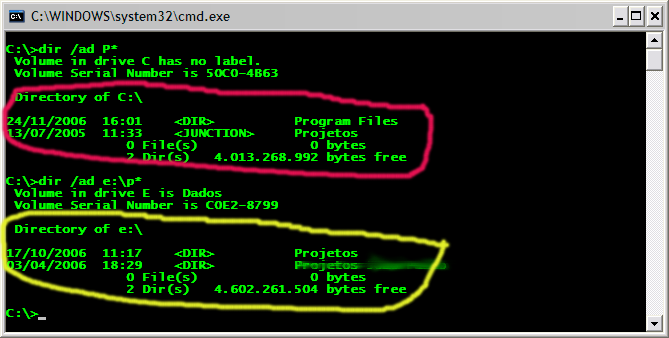
Como sempre a falta de tempo tem me impedido de postar mais frequentemente :( De qualquer forma, hoje pretendo apresentar um aplicativo bastante útil que usuários do Unix/Linux já estam bastante acostumados mas, por motivos que não importam, a marioria dos usuários do Windows desconhecem. Quando comecei a trabalhar na empresa que me encontro atualmente me deparei com a seguinte situação: todos os desenvolvedores criavam uma estrutura de diretórios fixa (por exemplo: c:\Projetos\NomeProjeto, ou algo parecido) e algumas ferramentas dependiam destes caminhos (pois usavam caminhos absolutos). Como sempre tive o habito de particionar meus HDs em pelo menos duas partições (uma para dados e a outra para programas) o drive C ficou para o SO (sistema operacional) e a partição de dados acabou ficando como E (ok, eu sei que posso mudar este mapeamento, mas eu não queria fazer isto por outros motivos). Para resolver este impasse (eu desejava colocar o diretório de projetos no drive E, mas algumas ferramentas esperavam que o mesmo se encontrasse no drive C) eu criei um Junction Point (ou ponto de junção) no drive C apontando para o drive E. Junction Points permitem que sejam criados links para diretórios em qualquer volume (por exemplo o diretório c:\projetos pode ser um Junction Point, ou seja, pode apontar, para o diretório c:\meus documentos\projetos). Assim, para solucionar o impasse fiz o seguinte:
  • Criei a estrutura de diretórios no drive E (E:\Projetos\Nome Projeto)
  • No drive C eu criei um Junction Point chamado Projetos apontando para E:\Projetos
  • desta forma ao acessar o diretório c:\Projetos na realidade estou acessando E:\Projetos.
O resultado pode ser visto na seguinte imagem: Observe que o c:\Projetos aparece no console como JUNCTION (e não como DIR como os demais diretórios) enquando e:\Projetos é apresentado (como era de se esperar) como DIR, indicando que o mesmo é um diretório comum. Agora, todas as operações que forem realizadas em c:\projetos na realidade estarão sendo realizadas em e:\projetos. E como criamos (manipulamos) Junction Points? A resposta rápida é que apesar do Windows suportar Junction Points desde o Windows 2000, por algum motivo que desconheço, a MS não possui uma forma simples para manipular Junction Points (aqui você pode encontrar explicações [em inglês] de como criar Junction Points com ferramentas da própria MS). Porém nem tudo esta perdido :). Você pode encontrar utilitários (gratuítos) que manipulam Junction Points aqui, aqui e aqui. Eu, particularmente, uso a primeira delas pois a mesma permite criar também Hard Links e Symbolik Links (no Windows Vista) além de possuir versões para x86 e x64.