Aug 31, 2012

My adventures with Arduino continues...

Hi

In this post I listed some components/shields/breakout boards that I want to try with Arduino. Well, last weak one of the missing components in order to test my ethernet breakout board (one very similar to the one in this post) arrived.


Like I child with a new toy I took the evening to try it out. After some time I finally got it connected (unfortunately there's not much information about the ethernet breakout board I've got in the net) but to my frustration I could not get it to work. :(


Basically I connected my Arduino Mega to the breakout as follows:

ENC28J60    Arduino
-------------------------
CLKOUT       NC
WOL            NC
SO               50
SI                51
SCK             52
CS               53
RESET          RESET
VCC             3v3
Gnd             Gnd

When I power up the Arduino board I can see that a red led also lights up on the ethernet breaakout board but its statuses leds does not blink / flash.

After a lot of time checking it my guess is that either the breakout board is defective or that it requires a crossover cable (I've tried various cables connecting it both my router and my computer directly) (
ENC28J60  datasheet claims that it supports "One 10Base-T Port with Automatic Polarity Detection and Correction" but this doesn't looks to be the same as auto MDI/MDIX to me).

Well next steps:
  • Ask for help on Arduino forums (already did)
  • Try to get a crossover cable to check.
  • Try to exchange it with a new one
  • Hope that someone have already faced this issue
As soon as I get any update to this I'll post comments here.

BTW, if you have any idea how to test / get this working, drop me a comment.

In time: I just received a "bluetooth" breakout board :) but this will need to wait to get tested.

Happy programming.

Aug 15, 2012

Windows 8 / Visual Studio 2012

Hi

Getting back to the subject I am more comfortable with, MS just released Windows 8 / VS 2012 (for MSDN and Technet subscribers). Off course I am downloading both right now but this is the first time, since Windows 95 launch, that I am not going to install the new MS OS as soon as it gets released. 


To be honest I am not even considering installing it (on my main dev machine) in the next 6 ~ 12 months! Contrast that to what I've been doing in the past 
(I've used Vista / Windows 7 RC!) and you can see how "excited" I am about it (maybe I install it on a virtual machine so I can experiment with it). Anyway, sooner or later I'll end up formatting my dev machine and the question is: am I going to give Windows 8 a try? Or shall I take a more drastic approach and install Ubuntu? This bring me to the second MS release.. VS 2012.

One of the main reasons I'm procrastinating migrating to a Linux OS is that I really enjoy developing using .Net (yeah, I do know Mono; the problem is: the bulk of .Net development is still concentrated on MS platform. Also, 
IMHO, *nix lacks a good .Net IDE).

Of course my friends (at least the ones in the software development field) knows that that is not completely  true: I also enjoy MS technology in general (COM+ pops up as one example).


What do you think? Should I dive into Windows 8?


BTW: Visual Studio download finished! This one for sure I'll get installed in the next few days ;)

Happy codding!

Aug 8, 2012

Connecting Nokia 5110 LCD breakout to Arduino

Hi

As I said in my last post, I have been playing with some hardware parts for Arduino.


In the "still to go" list I had:

  • Ethernet breakout
  • External EEPROM
  • RTC (DS 1307)
  • Nokia 5110 LCD
My plan was to tackle at least 2 of them during last weekend but I had a problem: all of this parts requires external components that I didn't have at hand. So I went to a local component shop but unfortunately I could not find most of the parts. 

The only part I had the required "missing" components was the Nokia LCD so I googled for "Nokia 5110 LCD  on Arduino" and voilá! The third entry in the results links to one great source of information about Arduino (and electronics in general). Now I was ready to start; I pulled my Arduino board, breadboard, the LCD (and required components) and put myself to connect them together.


My first disappointment came when I uploaded the sample application and nothing happened :(
Oopss.. maybe I have messed up with the connections... , let's see, pin x goes to y, pin z goes to w... no, everything looks connected correctly. After some head scratching I finally decided to do what I should have done from the beginning: Make sure the pin on my LCD breakout board matched the one in the Laydada  guide and of course they didn't! Compare the two pictures below (the red one is  mine and the blue one is the one used by ladyada):
As you can see they have different pinouts! Next step was to carefully reconnect the LCD and power on my Arduino (crossing my fingers hoping nothing bad had happened to neither my Arduino nor the LCD); this time everything but the backlight worked as expected; for some reason I could not explain the backlight refused to light up.  I checked and re-checked the connections many times but could not spot the problem. 

But at some point, during my investigation I could swear having seen the  backlight turning on and off; after some more testing I found out: by mistake I connected the backlight pin to the Arduino ground and that did the trick. But wait, both the LCD breakout schematic (not shown here) and the board itself does states that I should connect 3.3v on that pin... I have no idea what's happening here, but it is working. 

Next stop: external EEPROM.


Happy programming.

Aug 2, 2012

Now we are talking :)

Hi

Just a quick update on my Arduino experiments.


Some of my new "toys" just arrived....

I managed to get the following working so far:


  • Ultrasonic sensor (HC-SR04)
  • LCD 16 x 2
  • SD card
  • Temperature sensor (18B20)

Still to go:

  • Ethernet breakout
  • External EEPROM
  • RTC (DS 1307)
  • Nokia 5110 LCD

I am having lots of fun ;)

Lets get back to play with the ethernet breakout. 


See you.

Jul 28, 2012

My new remote control (as a prototype so far)

Hi.


Moving on with my Arduino experiments I decided to experiment with the infrared library (I said in the original post that one should be able to find a library for almost any piece of hardware he/she want to connect to Arduino) :).


After some research I found this library which worked almost out of the box. The only problem with this library is that it don't have the definitions for my TV (Samsung) so the only option would be to use "raw" data which is not as convenient as the "sendXXX()/decodeXXX()" methods. After a little bit more research I was able to find this post which describes how to change the IR library to work with Samsung TVs).


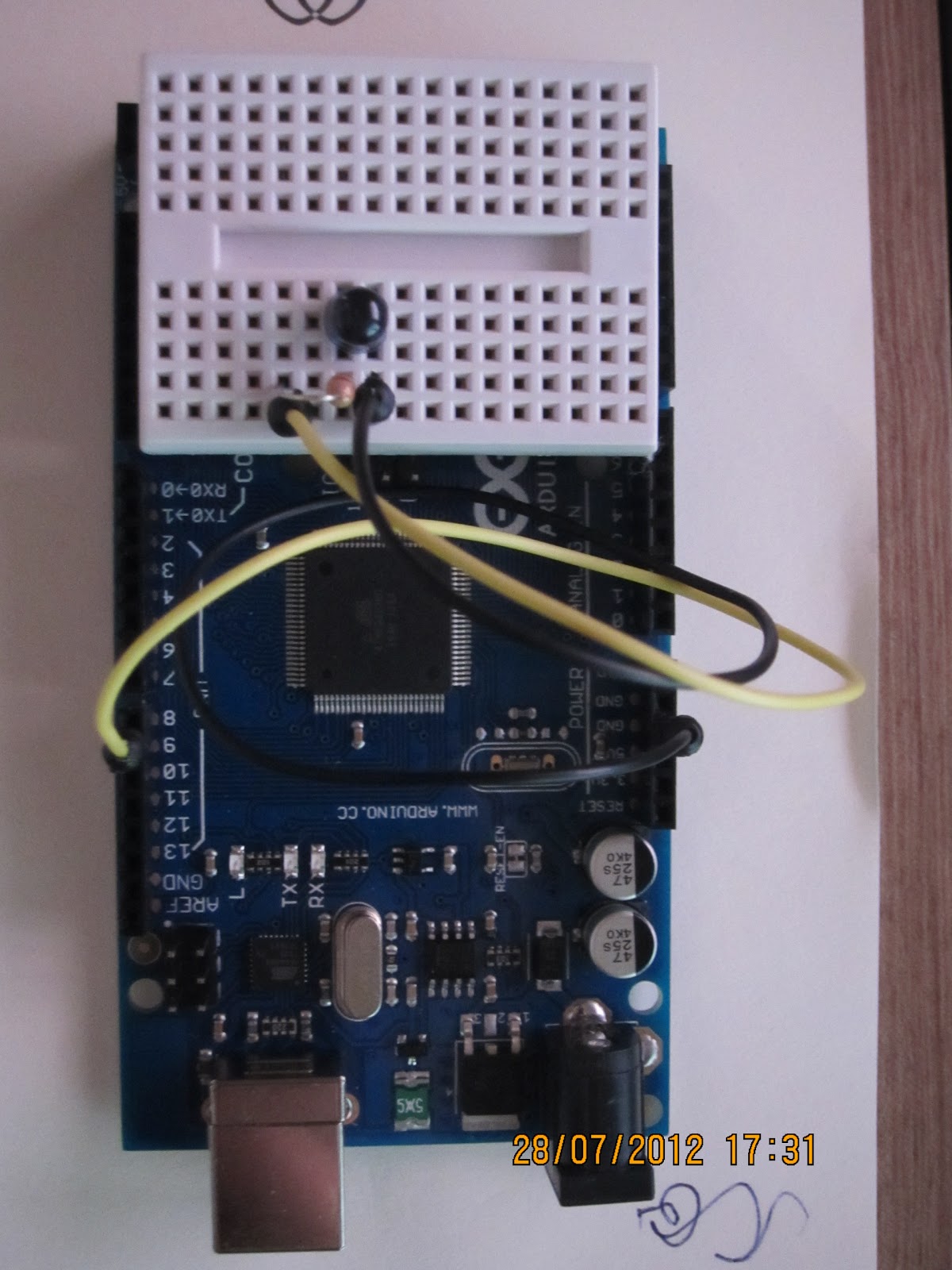
So here is the prototype for my new remote control. 


So far it is pretty limited (only turn on/off the tv) but I have big plans for it :)


Happy programming.


Adriano

Jul 24, 2012

Arduwhat ?

Hi
Since I was 5 ~ 8 years old I was interested in mechanics, electronics and how things worked in general - my mother has some interesting histories about me disassembling all sort of devices (and usually not being able to put them together again); one in particular in which I got a saw as a "gift" (I was only 6 or 7 and someone gave me a real saw, not a toy, plastic one!) and went to put it into good use sawing some furniture :).

Even though having a high interest in electronics I ended up in the computer software field (just to make it clear: I do enjoy being involved in such fast changing, challenging industry :) and since then I've been having lots of fun (and some frustrations also).
As anyone involved with IT knows, keeping up to date with such a fast changing field requires a lot of effort and over time I put my electronics pretensions to rest (after all there are enough fun stuff in the computer world to play with to keep me busy for a long time...).
But about one year ago this started to change as I started to play with some basic (really basic) electronics stuff again (just for fun) and I stumbled on a small but very interesting piece of hardware: a small board with a microcontroller and a lot of software support with some nice characteristics (at least from my point of view ;) :
  • Open Source Software / Hardware
  • Inexpensive (will not cost you an arm and a leg :)
  • Simple to work with, at least not as complex as the other options I had seem before (no complex, expensive tools required)
  • Easily integrated with the "external" world (through sensors/actuators).
  • Extensible (shields, breakout boards and virtually anything you want)
  • Well supported
  • Large community
which perfectly describes this nice board called "Arduino" (since the name Arduino is trademarked most probably you'll  find compatible devices under some generic brand named with a "duino" suffix).
At this point you may be wondering what can be accomplished with such beautiful piece of hardware... well, I guess it is fair to say that you can find an Arduino C/C++ library for virtually anything you can come up (of course this is not completely true, but it is not too far from the truth). IMO, the important  question is not "is it possible to connect X to Arduino" but instead "how hard is to connect X to Arduino" and based on the list bellow (which I wrote based on information I found) I conclude that, excluding more exotic hardware, it does pretty well job on this topic (note that almost all items in the list bellow requires extra hardware): 
  • Sensors
    • Temperature, Pressure, Gas, Light, Distance, Color, Humidity, Accelerometers, etc.
  • Communications
    • Bluetooth, TCP/IP, UDP/IP, Serial, GPRS, Infrared, etc.
  • Storage
    • EEPROM, SD cards
  • Actuators/Output
    • Step Motors, Servos, DC Motors, LCDs, etc
As you can see it is quite flexible, and more importantly, all of the hardware above have at least one Arduino library ready to be used.

This post is not intended to be an Arduino introduction / course / tutorial. Instead it is meant to be only a teaser so if you want to learn more, you can find lots of information in the internet. Personally there are some sites I highly recommend you to give a visit:

Also, if you want to buy Arduino related hardware you can go to your favorite search engine and search for it and I am sure you'll be able to find lots of stores that sell them. But if you don't want to search, bellow you can find a list of sites in which you can buy Arduino parts (ps: I have no affiliation with any of them :).


Finally, some electronics interesting tools:


Well, that's it. Now let me get back to play with my just arrived Arduino!

In the next post I hope to shed some light about my current projects related to Arduino (both soft and hardware).

Hope you found this post interesting.

Jul 7, 2012

Did you know (Part II) File / Registry virtualization on Windows 7 / Vista

Hi

In this post I discussed some issues I faced regarding software running on Vista 64 bits. Well it ended up that all my troubles was happening because my program (64 bits) was launching IE 64 bits (instead of the 32 bits) and I had not installed Silverlight plugin on it! Solution: just switch my program to 32 bits and it worked as expected!

In this post I want to discuss some pitfalls when running software on x64 bit versions of Windows (most of the discussion applies equally well to Vista x64 ,Windows 7 x64 and probably to newer versions also - haven't tried it with Windows  8 but I bet that the behavior is the same).


Keep in mind that when talking about the reasons that lead Microsoft to add a specific feature I am just speculating, so take every word with a grain of salt :)


On previous Windows versions, to many (almost every single?) developer used to login as
admistrator into their workstations1 so there were way to many applications that relied on being able to change system resources (such as to create files/fonders under "Program Files"), after all they always succeed doing that since developers had the rights to do so (remember, administrator...).

At Vista launch time MS had a tough issue to deal with: how raise the bar for system security / stability without breaking such ("legacy") applications?


AFAIK a compromise was settled so Windows development team decided that for
some 32 bit applications such requests would not fail, but instead, Windows would lie to the calling process and would just create the file somewhere else (the same principle apply to registry access): this feature is known as file virtualization (the rules that governs whether file/registry will be enabled or not for a specific process can be found here)

Note that this feature is meant to allow
legacy applications2 to run on the new platform (at that time, Windows Vista) so Microsoft plans to remove it (as soon as your application gets compiled as 64 bits, virtualization will be disabled anyway).

If you are running the 64 bits version of Windows 7 (or Vista for that matter) y
ou can try it right now by downloading the test application source3 and running it with something like:

FileSystemVirtualizationTest.exe -e %windir%\test.txt "adriano's test"
For now, just run it with the arguments shown above and take a closer look in the produced output:

Virtualization ENABLED.

Virtualization is ON

14 bytes writen to C:\Windows\test.txt
It seams that the application succeed in creating a file under %windir% (which it should obviously not be allowed to) but how can we confirm that? Easy, just run the application again now providing only the file name (the application will try to read the file and dump its contents):
FileSystemVirtualizationTest.exe %windir%\test.txt

Virtualization is ON

adriano's test
and there it is! But wait! Let's open Windows Explorer and try to locate the file. Hey! I can't find the file anymore! Windows search can't find it either:

But the application does succeeded opening the file! how can that be? Launch Windows Explorer again on %windir% folder but this time paying attention to the little button: "Compatibility Files":

Ok, now that you noticed this button, press it and Windows Explorer will open a folder that looks like the one bellow:


Wow! Windows just created the file under %localappdata%\VirtualStore\Windows folder (which is a per user folder). 

This way Windows let applications believe they had successfully updated files / folders / registry keys when actually they didn't (preventing possible global system corruption). Clearly avoiding system corruption is a fair reason to support this functionality, but now, developers (and IT admins) must pay attention to scenarios with mixed 32 / 64 bits applications interacting in such ways that they need to observe changes from each other (since the first ones may be writing to the virtual store and the last ones will not see the virtual store).

Last, but not least :), make sure your application do not depend on registry/file virtualization; these mechanisms were introduced sonly to raise the likelihood of legacy applications to run without problems on Windows versions with stricter security settings (Vista, 7, etc). So if you have an application that does writes to protected file system areas, please do your users a favor: update it to write to a more appropriated location (%appdata%, %localappdata%, etc).

Bellow you can find some links if you want to read more about file system virtualization:


Have fun!

Adriano


[1] I am guiltily of doing the same thing :(
[2] Basically all applications developed for previous Windows OSs are handled as legacy by Vista
[3] In the first drafts of this post I used Notepad++ to write to %windir% but it looks like they added a manifest in the latest versions so it will not work for our demonstration purposes. Even in my sample application I was required to remove the manifest explicitly (VS 10 included one that disabled virtualization)