Nov 20, 2007
Old news from the front!
Visual Studio 2008 has been released (Yep, I'm downloading it right now :)
Niiice.


Oct 24, 2007
Do you fear ghosts?
Well, me too, at least until one month ago :)
Seriously, a long time ago (maybe not so long), Rodrigo, a great friend of mine, started talking about write a new language for the .Net platform. Of course, I promptly ignored him, after all, who needs another computer language? Some time passed and I started to hear about a new language called Boo.
I was so deeply entrenched in my own world that it took me some time (and some books also :) to realize that that would be great to be exposed to a lot of new concepts (at least to me).
Well, yesterday I've wrote my first Boo program! Sure, it's a humble one but it's a start. In order to learn (not only the syntax, but a lot of concepts such closures, ducking typing, etc.) I'll try to write more code using boo from now on :)
And for those curious minds out there, here is my first piece of Boo code :)
def Sum(list):
 ret = 0
 for value as int in list:
    ret = ret + value
 return ret

list = (1, 2, 3, 4)
for v in list:
 print(v)

print Sum(list)
This is really very simple:
Lines 1 ~ 5 defines a function called Sum.
Line 7 declares a variable (list) that holds an integer list from 1 to 4
Lines 8 ~9 prints this list to console, item by item
Line 11 prints the result of Sum when called with list as the argument.
Thats it.
Adriano
Oct 8, 2007
Enabling transparent activation in your db4o applications
As a software developer, one common pattern I've found over and over again is the typical parent/child relationship.
In this post I'll present you a program (a WinForms based application) that lets you create, store and delete objects (representing tasks) that follows this common structure in a db4o database and take the opportunity to show how a new db4o feature (to be introduced in our next release) helps to solve some related problems.
Obs: I'll focus on the .Net side of db4o but these concepts apply equally to our Java interface. Also, in order to be able to access various links related in this post you'll be required to join (for free) the "db4o Developer Community"; it's a very simple process: just click on join when asked for your credentials (user name/password).
Ok, let's use the application for while ...
Open TaskSample.sln solution in Visual Studio 2005 (it should also work on the Express Edition) and compile it. Then, launch it and add some tasks by pressing "CTRL-A" or selecting "Tasks/Add.." menu.
Now add some tasks as the following structure ...

... close the database selecting "File/Close" in the main menu ...

... and reload it (select "File/Open") .
Now expand the tasks in order to see "Super hyper ultra mega project" sub tasks.

What? What happened to Components, GodenHammer.dll, GodenNail.dll and GondelHead.dll? Where are they?
Take it easy; I assure you that db4o didn't ate your task objects :) What happened is that our old friend, the cost/benefit trade-off is showing its ugly head.
In order to keep memory consumption low and object throughput high, db4o sets a hard limit on "how deep the rabbit hole goes" (a concept called activation depth), or, in other words, how many levels it is willing to go down in the object graph reading (activating) them from the database.
It just happens that in its current version, db4o sets this limit to 5, i.e, starting from each object directly selected by a query, at most 5 levels bellow will be returned.
That explains why the sub tasks were not loaded from the database. (they are six levels down the root task so db4o stopped following references when it reached the "Super hyper ultra mega project" task.
How can we ensure smooth operation of our application?
I recommend following the instrumentation path (let the computer do the dirty work for us :). Db4o ships with an utility program (Db4oTool.exe) that you may use among other duties, to instrument assemblies to support TA.
All you need is to call Db4oAdmin.exe after building your assemblies and it'll add the required pieces to support TA.
If you prefer, add a post build step to TaskSample.snl project as follows:
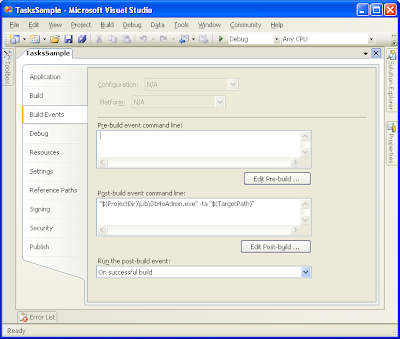 In order to instrument signed assemblies you'll need to delay sign them (because instrumentation process changes the assembly). For more information about delay signed assemblies, please, refer to this msdn article.
The application title bar shows you if the application was instrumented or not (if it supports TA or not).
 Try to play with the sample and check the results. You may download the sample (source files) for this post here.
Thank you and see you soon ;)
Adriano
In this post I'll present you a program (a WinForms based application) that lets you create, store and delete objects (representing tasks) that follows this common structure in a db4o database and take the opportunity to show how a new db4o feature (to be introduced in our next release) helps to solve some related problems.
Obs: I'll focus on the .Net side of db4o but these concepts apply equally to our Java interface. Also, in order to be able to access various links related in this post you'll be required to join (for free) the "db4o Developer Community"; it's a very simple process: just click on join when asked for your credentials (user name/password).
Ok, let's use the application for while ...
Open TaskSample.sln solution in Visual Studio 2005 (it should also work on the Express Edition) and compile it. Then, launch it and add some tasks by pressing "CTRL-A" or selecting "Tasks/Add.." menu.
Now add some tasks as the following structure ...
- Work
- Todo
- Projects
- Super hyper ultra mega project
- Components
- GoldenHammer.dll
- GoldenNail.dll
- GoldenHead.dll

... close the database selecting "File/Close" in the main menu ...

... and reload it (select "File/Open") .
Now expand the tasks in order to see "Super hyper ultra mega project" sub tasks.

What? What happened to Components, GodenHammer.dll, GodenNail.dll and GondelHead.dll? Where are they?
Take it easy; I assure you that db4o didn't ate your task objects :) What happened is that our old friend, the cost/benefit trade-off is showing its ugly head.
In order to keep memory consumption low and object throughput high, db4o sets a hard limit on "how deep the rabbit hole goes" (a concept called activation depth), or, in other words, how many levels it is willing to go down in the object graph reading (activating) them from the database.
It just happens that in its current version, db4o sets this limit to 5, i.e, starting from each object directly selected by a query, at most 5 levels bellow will be returned.
That explains why the sub tasks were not loaded from the database. (they are six levels down the root task so db4o stopped following references when it reached the "Super hyper ultra mega project" task.
How can we ensure smooth operation of our application?
- setting the activation level to a higher value might be an option (but which value? small values will activate too little objects; higher values may lead to high memory consumption and possibly out of memory exceptions):
IConfiguration configuration = Db4oFactory.NewConfiguration();
configuration.ObjectClass(typeof(Task)).MinimumActivationDepth(10);

using(IObjectContainer db = Db4oFactory.OpenFile(configuration, Db4oFileName))
{
// perform some work here
}
To test this option, select a higher activation depth (let's say, 8) in the sample application; the database will be reopened; now you'll be able to see all the tasks :) For more details about activation depth, please, see here.
- Manually activating objects as needed;
In this scenario we may track expansions in out task treeview and activate them as needed.
db.Activate(task, 1);
AddOutlines(task.FirsChild);
To test this option select the "Enables automatic activation" button on the toolbar (the little bulb lamp). The database will be reloaded and now you'll be able to see all tasks again.
- Or, IMHO, the best one, letting db4o take care of this through Transparent Activation (herein referred only as TA), a new feature to be introduced in our next release (download the latest development build here) (for more details and samples about this feature look here and here);
I recommend following the instrumentation path (let the computer do the dirty work for us :). Db4o ships with an utility program (Db4oTool.exe) that you may use among other duties, to instrument assemblies to support TA.
All you need is to call Db4oAdmin.exe after building your assemblies and it'll add the required pieces to support TA.
Db4oTool -ta assembly_name.ext\db4o-8.0\bin\net-3.0\Db4oTool.exe -ta "$(TargetPath)"
The application title bar shows you if the application was instrumented or not (if it supports TA or not).
 Try to play with the sample and check the results. You may download the sample (source files) for this post here.
Thank you and see you soon ;)
Adriano
Oct 6, 2007
New challenges.
This week I've joined db4objects team to contribute with the .Net development side (but I'm pretty sure I'll do a lot of Java development also). Indeed it has been a busy week; lots of new concepts and code to get to know, new management style, new tools, etc.
I'll be working from my home (cool!!), collaborating with a distributed (talented) development team through skype.
Some may call me crazy but db4objects have a cool product to work with and this opportunity will let me dedicate more time to my family, to study new topics (related to computers, of course), to watch movies, etc (I know, studies proved that working in home means to work more, but I'll get some spare time cause I'll not be required to go to jammed traffic :)
Also, you can expect to see more posts on this blog covering db4o ;)
Well, that's it.
Adriano
Sep 18, 2007
Minor db4o tutorial problem
Some time ago I started playing with db4objects, an object oriented database for Java and .Net.
After installing db4o it started this tutorial (C:\Program Files (x86)\Db4objects\db4o-6.3\doc\tutorial\Db4objects.Db4o.Tutorial.exe, on my 64 bits Windows Vista Box) and everything went as smooth as possible but, when I tried to restarted it in the next day, it failed and the following dialog was shown:

Looking at this dialog we can see that the program failed to delete a file called formula1.yap under C:\Program Files (x86)\Db4objects\db4o-6.3\doc\tutorial\ folder; so I launched Process Monitor and pushed Reset button in tutorial program again.

 It just confirms that the tutorial is failing to delete the file but why? Worse, why have it worked when we started it for the first time?
The .Net tutorial that comes with db4o has some minor bugs related to the way Windows Vista x64 handles writes to some specific paths, more specifically to %ProgramFiles% and %ProgramFiles(x86)% folders.
It's a Windows Vista feature called UAC (for detailed information about this topic please refer to this technet article) that prevents standard users (non administrators) from writing to some folders/registry keys, basically to keep the system more stable and secure. Actually it worked in the first time because
Ok, so how to fix this problem?
Basically there are 3 different approaches that can be applied:
In a future post I'll discuss a bit more about a UAC feature called File System and Registry Virtualization and why it wasn't applied in this case.
After installing db4o it started this tutorial (C:\Program Files (x86)\Db4objects\db4o-6.3\doc\tutorial\Db4objects.Db4o.Tutorial.exe, on my 64 bits Windows Vista Box) and everything went as smooth as possible but, when I tried to restarted it in the next day, it failed and the following dialog was shown:

Looking at this dialog we can see that the program failed to delete a file called formula1.yap under C:\Program Files (x86)\Db4objects\db4o-6.3\doc\tutorial\ folder; so I launched Process Monitor and pushed Reset button in tutorial program again.

 It just confirms that the tutorial is failing to delete the file but why? Worse, why have it worked when we started it for the first time?
The .Net tutorial that comes with db4o has some minor bugs related to the way Windows Vista x64 handles writes to some specific paths, more specifically to %ProgramFiles% and %ProgramFiles(x86)% folders.
It's a Windows Vista feature called UAC (for detailed information about this topic please refer to this technet article) that prevents standard users (non administrators) from writing to some folders/registry keys, basically to keep the system more stable and secure. Actually it worked in the first time because
Ok, so how to fix this problem?
Basically there are 3 different approaches that can be applied:
- The "Quick and Dirty" way (probably the easiest and fastest one) is to run the tutorial as an administrator. To do this just right click on the tutorial program and select "run as administrator".

- The second one consists in adding a manifest next to the tutorial program ( (warning: Windows Vista/.Net will cache the tutorial program and will not pick you fresh manifest :(. In this case you can just "touch" the tutorial program -- or move it to another folder -- and Windows will load the manifest in the next time you start it as explained here). This simply instructs Windows to start the program with administrator rights.
- The last one (and in my opinion the correct one) consists in fixing the tutorial in order to save this file under %LocalAppData% (or %AppData%) instead of its installation folder (thats the recommended action by Microsoft).

In a future post I'll discuss a bit more about a UAC feature called File System and Registry Virtualization and why it wasn't applied in this case.
Sep 10, 2007
Another post in the series RTFM :)
As I've said in my last post, I'm reading C# 3.0 specification.
Well, it's amazing what you can learn when you do take the time to learn more about the tools (in this case, the language) you use all day long :).
This time I've find out that it's possible to use reserved words as identifiers!
Amazing! (and of course, dangerous as it make it harder to read your code.)
But this isn't a new feature of C# 3.0; it works with C# 2.0 (.Net Framework 2.0)!
Just copy the following sample and compile it using CSharp compiler from .Net Framework 2.0!
public class @class
{
   private static void Main()
   {
      int @int = 10;
      int @delegate = @int + 30;;
      System.Console.WriteLine("Values {0} {1}", @int, @delegate);
   }
}
What do you think about using reserved words as identifiers? Let the world know your opinion! :)
Adriano
Sep 4, 2007
?? Operator.. What is it good for?
Hi,
Other day I was poking around C# 2.0 documentation and noted a different operator I had never seen before, ?? so I thought with myself: what is it good for?
Well, after reading the documentation (remember, RTFM :) I couldn't believe I didn't known this before!
The ?? operator is a binary operator that checks the left operand against null. If it is null, the expression result is the right operand value otherwise (left operand is not null) it will be the left operand value.
See a sample:
string name = null;
Console.WriteLine("Value: {0}", name ?? "(null)"); // Writes: Value: (null)

name = "Adriano";
Console.WriteLine("Value: {0}", name ?? "(null)"); // Writes: Value: Adriano
Also, it is useful when used in conjunction to nullable value types.
int? i = null;
Console.WriteLine("Value: {0}", i ?? -1); // Writes: Value: (null)

i = 20;
Console.WriteLine("Value: {0}", i ?? -1); // Writes: Value: 20
PS: I've just started to play with C# 3.0 (Visual Studio 2008 beta 2) and it seams to be a very strong language.
PS2: Finally I managed to get SyntaxHighlighter to work with blogger (thanks to this post)
As soon as I got more information I'll post my impressions here :)
See you soon!
Subscribe to:
Posts (Atom)