Apr 22, 2008
Db4o news!
Hi,
Db4o just announced a new release! Check it out here and let us know what you think about these new (IMO) cool features!
Adriano


Apr 9, 2008
A Linq playground for you and your objects
In this post we'll implement a very basic Linq Console application that supports "ad hoc" queries allowing users to enter Linq queries and run them against a db4o database. Our main goal is to show how such mechanism can be implemented on top of Linq/Db4o.
That said, let's play with the application for a while and them dig a little bit in its code.
How to use it ?
First, download the code here and compile it (any version of Visual Studio 2008 can be used).
Now populate a db4o database (with data) and copy the an assembly containing the types stored in that database to the LinqConsole.exe folder.
Start the application and, once presented the prompt (>), enter commands (prefixed with ":") or a query (finished with ";"). The very first command you may want to try is :help to see a list of valid commands (type :help and press):  Basically, we want to run a (Linq) query against a db4o database, so we need to specify:
and press to see the results:

Before leaving this topic, I'd like to call your attention that in order to Linq for db4o to work you need to specify a type in the query (that's the entry point for our custom "Linq Provider"), otherwise, you will get an error like the one bellow:

Note that in this case I've omitted Person type in the query, i.e, I've typed:
instead of:
How it works ?
The basic idea behind this application is pretty simple: Given a model assembly (specified through load command), a db4o database (specified through database command) and a Linq query, find all types and namespaces defined in such assembly them emit code to run the query against the database.
In CompileQuery() method we emit a new type (TheQuery) using the specified values (database, namespace and query). This type implements IInteractiveQuery interface, so, after instantiating it we call its Run() method to execute the query.
In order to dynamically compile this type (TheQuery) we use classes defined in System.CodeDom.Compiler and Microsoft.CSharp namespaces; any compilation errors will be rendered in red on yellow background text.
Improvements
Well, I must admit: in its current state, this program has some limitations (but most of them are there to allow you to play with it ;)
From the top of my head, I can came up with a list (of coarse, not an exhaustive one) of possible improvements:
I really expect that you enjoyed this application; if you have questions/suggestions please, fell free to drop me a line :)
Thoughts?
Adriano
That said, let's play with the application for a while and them dig a little bit in its code.
How to use it ?
First, download the code here and compile it (any version of Visual Studio 2008 can be used).
Now populate a db4o database (with data) and copy the an assembly containing the types stored in that database to the LinqConsole.exe folder.
You will need to copy your model assembly to
LinqConsole executable directory, otherwise it
will not be able to find it.
Start the application and, once presented the prompt (>), enter commands (prefixed with ":") or a query (finished with ";"). The very first command you may want to try is :help to see a list of valid commands (type :help and press

- the database file to query (through database command)
- the assembly containing the types stored in the database; we call this assembly, model assembly because usually, it will hold your business objects (the model in MVC pattern). Unfortunately, this assembly must be in the same directory as the application, otherwise the application will not be it able to find it (technically one can configure the application using Linq.Console.exe.config file to allow assemblies to be stored in alternative directories).
from Type t in database select t;

Before leaving this topic, I'd like to call your attention that in order to Linq for db4o to work you need to specify a type in the query (that's the entry point for our custom "Linq Provider"), otherwise, you will get an error like the one bellow:

Note that in this case I've omitted Person type in the query, i.e, I've typed:
from p in database select p;
instead of:
from Person p in database select p;
How it works ?
The basic idea behind this application is pretty simple: Given a model assembly (specified through load command), a db4o database (specified through database command) and a Linq query, find all types and namespaces defined in such assembly them emit code to run the query against the database.
In CompileQuery() method we emit a new type (TheQuery) using the specified values (database, namespace and query). This type implements IInteractiveQuery interface, so, after instantiating it we call its Run() method to execute the query.
In order to dynamically compile this type (TheQuery) we use classes defined in System.CodeDom.Compiler and Microsoft.CSharp namespaces; any compilation errors will be rendered in red on yellow background text.
Improvements
Well, I must admit: in its current state, this program has some limitations (but most of them are there to allow you to play with it ;)
From the top of my head, I can came up with a list (of coarse, not an exhaustive one) of possible improvements:
Support model assemblies in other directories
Currently in order to use a model assembly, users are required to copy it to the application folder.- Check if the types stored in the database can be found in the model assembly.
- Better error handling in general
- Warn users about invalid commands Currently nothing happens for invalid commands (no message).
- List types inside an assembly A new command (for instance, types) could be added to allow users to list the types contained in an assembly.
- Add support to query Db4o in server mode.
- Auto-completion This probably would require major changes in the input handling, but it would be nice to add auto-completion to list types, assemblies, databases, etc. in the commands.
- You name it! The sky is the limit :)
I really expect that you enjoyed this application; if you have questions/suggestions please, fell free to drop me a line :)
Thoughts?
Adriano
Dec 10, 2007
Activation in depth
In this post I'll discuss a key concept of db4o and how it improved in our latest versions: object activation. I'll focus mainly on the .Net version but these concepts apply equally well to the Java version.
In order to access some resources listed in this post you will be required to register (for free) in http://developer.db4o.com.
Activation in depth
Activation in db4o parlance is the process of loading object data from the database to memory. You can see this concept in practice by asking db4o to not activate objects at all and having a look at them. Objects that are not activated will have only its object identity loaded from the database (In order to see the identifier for an object stored in db4o you can
IObjectContainer.Ext().GetId(obj);)
After building the graph of candidates (objects that satisfies a query's conditions), db4o needs to know how deep in this graph it must go activating (i.e, reading the object's data into memory). At this point it may seems that we have two contradictory objectives: i) we want to make db4o as transparent as possible to developers (making it easier to be used); ii) we do want to make sure that db4o will use computational resources (in this case memory) as efficiently as possible.
The simple approach to achieve i is to activate the whole graph but this clearly contrasts to ii because it may exhaust all free memory if the query returned a lot of objects. By the other hand, the easiest way to achieve ii (from the perspective of memory utilization) is to read only the identity of the objects in the graph and leave to the developer the responsibility to activate them when needed. Again, this strategy goes against the other one (i.e, simplicity of use). db4o latest versions includes a new functionality (conceptually called Transparent Activation, or simple TA for brevity) aimed to achieve both goals (i and ii) without sacrificing each other.
Consider the following classes:
and the following objects in the database:
The following image shows the result when querying for "Caroline" at different activation depths (with Transparent Activation disabled):

Note that at depth 0 (zero) only the object identifier for "Caroline" (1336) was loaded from the database; at depth 1 Caroline's value types were fully loaded and reference fields were initialized (to null) but not activated (see Caroline's address and parent fields). At depth 2 Caroline's parent object was also loaded (and activated) but its reference fields (for instance Caroline's grand father) were not activated yet.
Related Concepts
The same trade-of (simplicity/performance) applies when updating objects in a db4o database; I mean, usually you'll not want to update the whole set of objects reachable from the one you are currently updating because this would probably end up updating a lot of objects needlessly. To control this behavior you may configure the update depth through IConfiguration.UpdateDepth() method which takes an integer meaning how deep db4o will go when updating objects (keep in mind that when inserting, db4o will follow all references and insert all of then). This configuration may be globally (i.e, to all classes) or selectively applied (i.e, to specific classes). As of the current version db4o sets the default update depth to 0 that means that only value types and strings fields will be updated when an object is updated (i.e, reference fields will not be updated). Optionally it's possible to propagate updates to all objects reachable from the object being updated by configuring cascade on update for the specific classes you want to propagate updates.
When configured this way, db4o will go down, updating all objects reachable from your_type until it reaches an object not configured for cascade updating (note that this may impact performance severely if this object references a lot of objects also configured for cascade updating).
Transparent Activation
Transparent Activation is a functionality that enables developers to handle objects returned by queries as if they were fully activated without incurring the cost of activating a whole graph of objects. In other words, when TA is enabled, developers may code as if activation depth was set to infinity without having to worry about the whole set of objects being loaded into memory. Basically, Transparent Activation transfers the responsibility of object activation from developers to db4o allowing them to focus on their business logic.
Configuring your db4o projects to use TA is 2 steps process:
More technical details about TA can be found here and a full sample along with details about it can be found here.
Putting it all together
Here you can checkout the sample application that shows the points discussed above. It inserts a simple graph of objects into a database and then queries for the root of the objects using different activation depth configurations. Also, you can ask the application to pretend that it's objects supports TA through the -ta command line option.
I recommend you to download it and do the following:
If you have any question don't hesitate to ask them here!
Adriano
In order to access some resources listed in this post you will be required to register (for free) in http://developer.db4o.com.
Activation in depth
Activation in db4o parlance is the process of loading object data from the database to memory. You can see this concept in practice by asking db4o to not activate objects at all and having a look at them. Objects that are not activated will have only its object identity loaded from the database (In order to see the identifier for an object stored in db4o you can
IObjectContainer.Ext().GetId(obj);)
After building the graph of candidates (objects that satisfies a query's conditions), db4o needs to know how deep in this graph it must go activating (i.e, reading the object's data into memory). At this point it may seems that we have two contradictory objectives: i) we want to make db4o as transparent as possible to developers (making it easier to be used); ii) we do want to make sure that db4o will use computational resources (in this case memory) as efficiently as possible.
The simple approach to achieve i is to activate the whole graph but this clearly contrasts to ii because it may exhaust all free memory if the query returned a lot of objects. By the other hand, the easiest way to achieve ii (from the perspective of memory utilization) is to read only the identity of the objects in the graph and leave to the developer the responsibility to activate them when needed. Again, this strategy goes against the other one (i.e, simplicity of use). db4o latest versions includes a new functionality (conceptually called Transparent Activation, or simple TA for brevity) aimed to achieve both goals (i and ii) without sacrificing each other.
Consider the following classes:
public class Person : SupportObjectId
{
    private Address address;

    public Address Address
    {
        get { return address; }
        set { address = value; }
    }

    private string name;

    public string Name
   {
        get { return name; }
        set { name = value; }
   }

   private int age;

   public int Age
  {
      get { return age; }
     set { age = value; }
  }

   private Person parent;

   public Person Parent
   {
       get { return parent; }
       set { parent = value; }
   }

   public Person(string name, int age, Address address, Person parent)
   {
        this.name = name;
        this.address = address;
        this.age = age;
        this.parent = parent;
    }

   public override string ToString()
   {
       return PrintInfo(0);
   }

   private string PrintInfo(int i)
   {
       string tab = new string('\t', i);
      return string.Format("{0} {4} {1}{5}\r\n{4}{4}Address: {2}\r\n{4}{4}Parent: {3}",
                                        (name ?? "null"),
                                        age,
                                        (address != null ? address.ToString() : "null"),
                                        (parent != null ? parent.PrintInfo(i+1) : "null"),
                                       tab,
                                      base.ToString());
    }
}

public class Address : SupportObjectId
{
    private string street;
    public string Street
    {
         get { return street; }
         set { street = value; }
    }

    private int number;
    public int Number
    {
        get { return number; }
        set { number = value; }
    }

    private string city;
    public string City
   {
        get { return city; }
        set { city = value; }
   }

    public Address(string city, string street, int number)
   {
        this.city = city;
        this.street = street;
       this.number = number;
   }

   public override string ToString()
   {
        return "[" + (street ?? "**") + "(" + number + ") - " + (city ?? "**") + base.ToString() + "]" ;
   }
}
and the following objects in the database:
private static void InsertData()
{
     using (IObjectContainer db = Db4oFactory.OpenFile(DATABASE_FILE))
    {
         Person grandParent = new Person("Joseph", 65, new Address("Descalvado", "JV street", 160), null);
         Person father = new Person("Adrian", 36, new Address("São Paulo", "C. L. E. M. street", 250), grandParent);
         Person child = new Person("Caroline", 4, new Address("São Paulo", "C. L. E. M. street", 250), father);

         db.Set(child);
    }
}
The following image shows the result when querying for "Caroline" at different activation depths (with Transparent Activation disabled):

Note that at depth 0 (zero) only the object identifier for "Caroline" (1336) was loaded from the database; at depth 1 Caroline's value types were fully loaded and reference fields were initialized (to null) but not activated (see Caroline's address and parent fields). At depth 2 Caroline's parent object was also loaded (and activated) but its reference fields (for instance Caroline's grand father) were not activated yet.
Related Concepts
The same trade-of (simplicity/performance) applies when updating objects in a db4o database; I mean, usually you'll not want to update the whole set of objects reachable from the one you are currently updating because this would probably end up updating a lot of objects needlessly. To control this behavior you may configure the update depth through IConfiguration.UpdateDepth() method which takes an integer meaning how deep db4o will go when updating objects (keep in mind that when inserting, db4o will follow all references and insert all of then). This configuration may be globally (i.e, to all classes) or selectively applied (i.e, to specific classes). As of the current version db4o sets the default update depth to 0 that means that only value types and strings fields will be updated when an object is updated (i.e, reference fields will not be updated). Optionally it's possible to propagate updates to all objects reachable from the object being updated by configuring cascade on update for the specific classes you want to propagate updates.
IConfiguration.ObjectClass(typeof(your_type)).CascadeOnUpdate(true);
When configured this way, db4o will go down, updating all objects reachable from your_type until it reaches an object not configured for cascade updating (note that this may impact performance severely if this object references a lot of objects also configured for cascade updating).
Transparent Activation
Transparent Activation is a functionality that enables developers to handle objects returned by queries as if they were fully activated without incurring the cost of activating a whole graph of objects. In other words, when TA is enabled, developers may code as if activation depth was set to infinity without having to worry about the whole set of objects being loaded into memory. Basically, Transparent Activation transfers the responsibility of object activation from developers to db4o allowing them to focus on their business logic.
Configuring your db4o projects to use TA is 2 steps process:
- Configure TA support (prior to opening the database):
IConfiguration.Add(new TransparentActivationSupport());
- implement IActivatable interface in classes you want to be TA aware.
You can implement it by yourself or let us (ok, our tools) to do this work for you through Db4oTool (the old Db4oAdmin) application.
More technical details about TA can be found here and a full sample along with details about it can be found here.
Putting it all together
Here you can checkout the sample application that shows the points discussed above. It inserts a simple graph of objects into a database and then queries for the root of the objects using different activation depth configurations. Also, you can ask the application to pretend that it's objects supports TA through the -ta command line option.
I recommend you to download it and do the following:
- Poke around, looking into the code :)
- Give it a try, i.e, run it without any parameter and see what you get;
- Try to run it again, but this time passing -ta parameter, and, again, see what you get;
- Make its classes TA aware (see here the easy way) and try to run it with and without -ta parameter.
If you have any question don't hesitate to ask them here!
Adriano
Nov 20, 2007
Old news from the front!
Visual Studio 2008 has been released (Yep, I'm downloading it right now :)
Niiice.
Oct 24, 2007
Do you fear ghosts?
Well, me too, at least until one month ago :)
Seriously, a long time ago (maybe not so long), Rodrigo, a great friend of mine, started talking about write a new language for the .Net platform. Of course, I promptly ignored him, after all, who needs another computer language? Some time passed and I started to hear about a new language called Boo.
I was so deeply entrenched in my own world that it took me some time (and some books also :) to realize that that would be great to be exposed to a lot of new concepts (at least to me).
Well, yesterday I've wrote my first Boo program! Sure, it's a humble one but it's a start. In order to learn (not only the syntax, but a lot of concepts such closures, ducking typing, etc.) I'll try to write more code using boo from now on :)
And for those curious minds out there, here is my first piece of Boo code :)
def Sum(list):
 ret = 0
 for value as int in list:
    ret = ret + value
 return ret

list = (1, 2, 3, 4)
for v in list:
 print(v)

print Sum(list)
This is really very simple:
Lines 1 ~ 5 defines a function called Sum.
Line 7 declares a variable (list) that holds an integer list from 1 to 4
Lines 8 ~9 prints this list to console, item by item
Line 11 prints the result of Sum when called with list as the argument.
Thats it.
Adriano
Oct 8, 2007
Enabling transparent activation in your db4o applications
As a software developer, one common pattern I've found over and over again is the typical parent/child relationship.
In this post I'll present you a program (a WinForms based application) that lets you create, store and delete objects (representing tasks) that follows this common structure in a db4o database and take the opportunity to show how a new db4o feature (to be introduced in our next release) helps to solve some related problems.
Obs: I'll focus on the .Net side of db4o but these concepts apply equally to our Java interface. Also, in order to be able to access various links related in this post you'll be required to join (for free) the "db4o Developer Community"; it's a very simple process: just click on join when asked for your credentials (user name/password).
Ok, let's use the application for while ...
Open TaskSample.sln solution in Visual Studio 2005 (it should also work on the Express Edition) and compile it. Then, launch it and add some tasks by pressing "CTRL-A" or selecting "Tasks/Add.." menu.
Now add some tasks as the following structure ...

... close the database selecting "File/Close" in the main menu ...

... and reload it (select "File/Open") .
Now expand the tasks in order to see "Super hyper ultra mega project" sub tasks.

What? What happened to Components, GodenHammer.dll, GodenNail.dll and GondelHead.dll? Where are they?
Take it easy; I assure you that db4o didn't ate your task objects :) What happened is that our old friend, the cost/benefit trade-off is showing its ugly head.
In order to keep memory consumption low and object throughput high, db4o sets a hard limit on "how deep the rabbit hole goes" (a concept called activation depth), or, in other words, how many levels it is willing to go down in the object graph reading (activating) them from the database.
It just happens that in its current version, db4o sets this limit to 5, i.e, starting from each object directly selected by a query, at most 5 levels bellow will be returned.
That explains why the sub tasks were not loaded from the database. (they are six levels down the root task so db4o stopped following references when it reached the "Super hyper ultra mega project" task.
How can we ensure smooth operation of our application?
I recommend following the instrumentation path (let the computer do the dirty work for us :). Db4o ships with an utility program (Db4oTool.exe) that you may use among other duties, to instrument assemblies to support TA.
All you need is to call Db4oAdmin.exe after building your assemblies and it'll add the required pieces to support TA.
If you prefer, add a post build step to TaskSample.snl project as follows:
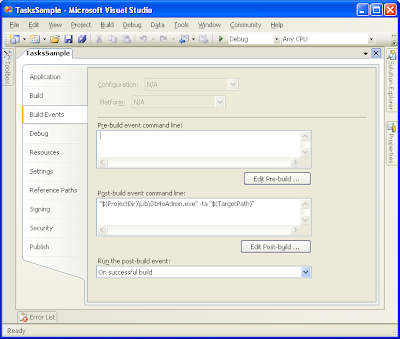 In order to instrument signed assemblies you'll need to delay sign them (because instrumentation process changes the assembly). For more information about delay signed assemblies, please, refer to this msdn article.
The application title bar shows you if the application was instrumented or not (if it supports TA or not).
 Try to play with the sample and check the results. You may download the sample (source files) for this post here.
Thank you and see you soon ;)
Adriano
In this post I'll present you a program (a WinForms based application) that lets you create, store and delete objects (representing tasks) that follows this common structure in a db4o database and take the opportunity to show how a new db4o feature (to be introduced in our next release) helps to solve some related problems.
Obs: I'll focus on the .Net side of db4o but these concepts apply equally to our Java interface. Also, in order to be able to access various links related in this post you'll be required to join (for free) the "db4o Developer Community"; it's a very simple process: just click on join when asked for your credentials (user name/password).
Ok, let's use the application for while ...
Open TaskSample.sln solution in Visual Studio 2005 (it should also work on the Express Edition) and compile it. Then, launch it and add some tasks by pressing "CTRL-A" or selecting "Tasks/Add.." menu.
Now add some tasks as the following structure ...
- Work
- Todo
- Projects
- Super hyper ultra mega project
- Components
- GoldenHammer.dll
- GoldenNail.dll
- GoldenHead.dll

... close the database selecting "File/Close" in the main menu ...

... and reload it (select "File/Open") .
Now expand the tasks in order to see "Super hyper ultra mega project" sub tasks.

What? What happened to Components, GodenHammer.dll, GodenNail.dll and GondelHead.dll? Where are they?
Take it easy; I assure you that db4o didn't ate your task objects :) What happened is that our old friend, the cost/benefit trade-off is showing its ugly head.
In order to keep memory consumption low and object throughput high, db4o sets a hard limit on "how deep the rabbit hole goes" (a concept called activation depth), or, in other words, how many levels it is willing to go down in the object graph reading (activating) them from the database.
It just happens that in its current version, db4o sets this limit to 5, i.e, starting from each object directly selected by a query, at most 5 levels bellow will be returned.
That explains why the sub tasks were not loaded from the database. (they are six levels down the root task so db4o stopped following references when it reached the "Super hyper ultra mega project" task.
How can we ensure smooth operation of our application?
- setting the activation level to a higher value might be an option (but which value? small values will activate too little objects; higher values may lead to high memory consumption and possibly out of memory exceptions):
IConfiguration configuration = Db4oFactory.NewConfiguration();
configuration.ObjectClass(typeof(Task)).MinimumActivationDepth(10);

using(IObjectContainer db = Db4oFactory.OpenFile(configuration, Db4oFileName))
{
// perform some work here
}
To test this option, select a higher activation depth (let's say, 8) in the sample application; the database will be reopened; now you'll be able to see all the tasks :) For more details about activation depth, please, see here.
- Manually activating objects as needed;
In this scenario we may track expansions in out task treeview and activate them as needed.
db.Activate(task, 1);
AddOutlines(task.FirsChild);
To test this option select the "Enables automatic activation" button on the toolbar (the little bulb lamp). The database will be reloaded and now you'll be able to see all tasks again.
- Or, IMHO, the best one, letting db4o take care of this through Transparent Activation (herein referred only as TA), a new feature to be introduced in our next release (download the latest development build here) (for more details and samples about this feature look here and here);
I recommend following the instrumentation path (let the computer do the dirty work for us :). Db4o ships with an utility program (Db4oTool.exe) that you may use among other duties, to instrument assemblies to support TA.
All you need is to call Db4oAdmin.exe after building your assemblies and it'll add the required pieces to support TA.
Db4oTool -ta assembly_name.ext\db4o-8.0\bin\net-3.0\Db4oTool.exe -ta "$(TargetPath)"
The application title bar shows you if the application was instrumented or not (if it supports TA or not).
 Try to play with the sample and check the results. You may download the sample (source files) for this post here.
Thank you and see you soon ;)
Adriano
Oct 6, 2007
New challenges.
This week I've joined db4objects team to contribute with the .Net development side (but I'm pretty sure I'll do a lot of Java development also). Indeed it has been a busy week; lots of new concepts and code to get to know, new management style, new tools, etc.
I'll be working from my home (cool!!), collaborating with a distributed (talented) development team through skype.
Some may call me crazy but db4objects have a cool product to work with and this opportunity will let me dedicate more time to my family, to study new topics (related to computers, of course), to watch movies, etc (I know, studies proved that working in home means to work more, but I'll get some spare time cause I'll not be required to go to jammed traffic :)
Also, you can expect to see more posts on this blog covering db4o ;)
Well, that's it.
Adriano
Subscribe to:
Posts (Atom)